
Tips, Tricks, and Solutions for Ink Cartridges
Canon, Epson, Dell, Brother
CANON CL SERIES INK CARTRIDGES
These cartridges include the Canon CL-30, CL-31, CL-40, CL-41, CL-50, CL-51 & CL-52.
Downloading this reset tool for ip printers iPTool.zip or for MP printers MPTool.zip or following these tips may reset these printer cartridges.
Error Message:
"An ink cartridge that was once empty is installed. U162"
The function for detecting the remaining ink level will be disabled since the remaining ink level cannot be correctly detected. If
you want to continue printing without this function, press the <OK> button.
Note: This operation will disable the ink level status detection for that ink
tank until the tank is replaced with new Canon ink cartridge.
For those of you that are refilling the same ink cartridge that came with your printer, clicking <OK> will suffice to get you back to printing. The only drawback will be the ink level monitor might not be recognizing the levels of ink. Canon is so aggressive with its ink programming, that they force you to buy their expensive ink cartridges
Error Message: "An ink cartridge cannot be recognized"
This error will occur when you swap out your cartridge into another printer when the ink counter is still working. In other words, you can only use the cartridge that was originally put in the printer in the first place. That means you can't "borrow" your coworker's CL cartridges and use them, you can't take them from your fathers's IP Pixma to print out your essays. This also applies to the InkCloners.com cloned CL series cartrides. Any other printer using that cartridge will see the cartridge as a "used" cartridge and will not function.
Solution: Take the cartridge out of the machine, turn the power off, turn the power back on, re-install the cartridge and hit the resume button the printer will reset itself so you can start printing again
Trick for the "NOT RECOGNIZED" Error Message:
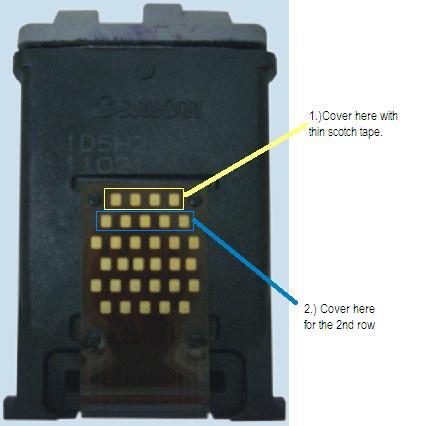
- 1 - cover the contacts of the 1st row with tape.
- 2 - put the Cartridge in the printer, it will say "cartridge not inserted"
- 3 - take the Cartridge out of the printer
- 4 - cover the contacts of the 2nd row with tape.
- 5 - put the Cartridge in the printer and same error will ocour.
- 6 - take the Cartridge out of the printer.
- 7 - take both tapes off from the Cartridge
- 8 - put the Cartridge in the printer, it will now tell you that the Cartridge is full.
- 9 - do this for the color first. It is ususally the trouble one. Then continue to the black one.
- **10(update 4/2008) - people have had luck applying a strip of tape to the bottom row first instead of the top row.
CANON DRIVERS
1.) Pixma MX310
CANON PG-210 & CL-211 INK CARTRIDGES
Error Message: "An ink cartridge cannot be recognized"
This error will occur when you reuse and refill your ink cartridges.
Error Message: "An ink cartridge cannot be recognized" aka non-genuine ink warning message
This error will occur when using non-OEM ink cartridges or there might be a conflict with the cartridges and printer.
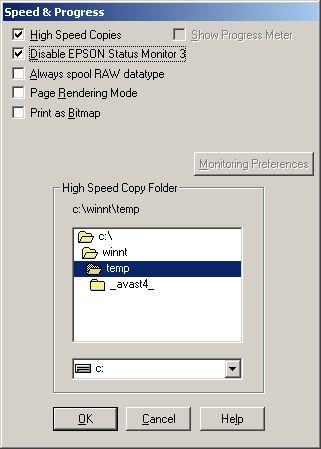
Solution: Disabling the EPSON Status Monitor is the only way to stop annoying warning messages due to using third-party ink cartridges including the non-genuine ink warning message.
- Select 'START'
- Select 'Control Panel'
- Select 'Printer and Faxes'
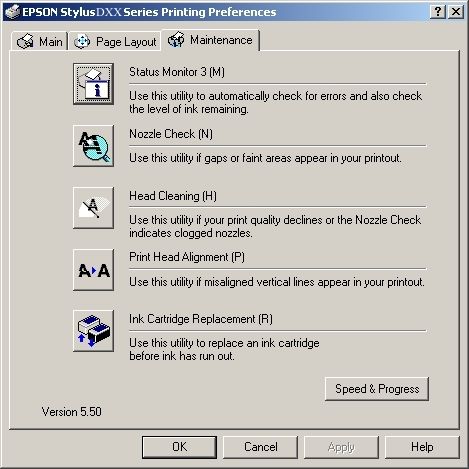
- 'Right' Click on your printer icon Select 'Printer Preferences'
- Find the box that reads 'Speed and Progress'
- Click in the empty box next to 'Disable Epson Status Monitor' A tick will appear in the box
- Select 'Save'
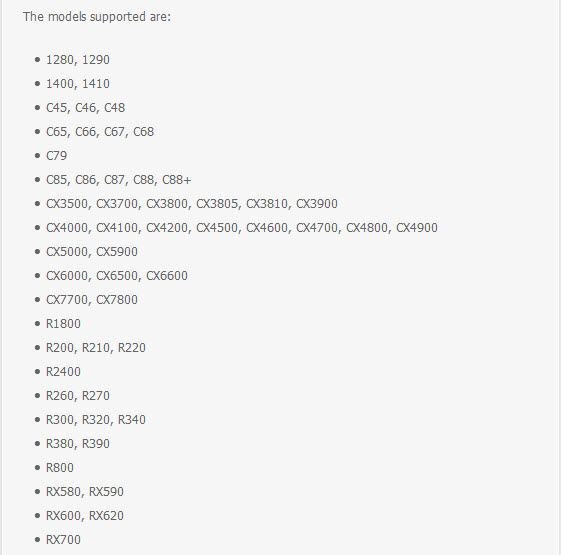
We have come across an Epson Printer Service Utility tool to allow you to do many amazing things with Your Epson printer:
- 1) Work directly with CSIC in Epson Stylus printers cartridges.
- 2) Reset or rewrite any chip using special addon device.
- 3) Freeze internal ink counters.
- 4) Reset internal ink counters even with empty cartridges.
- 5) Separate cleaning of color and black heads for all Epson inkjet printers, powerful cleaning mode.
- 6) Hot swapping of cartridges supported.
- 7) Resetting of protection counter (even then it is already full).
- 8) More then 100 different Epson printers supported
Try this tool to reset your Epson Printer: download SSC Service Utility There is a help file included with this program. Many people have been successful in resetting their Epson ink cartridge levels. In addition, here is an official reset utility from Epson: Epson IPR Utility
Error Message: "Low or No Ink"
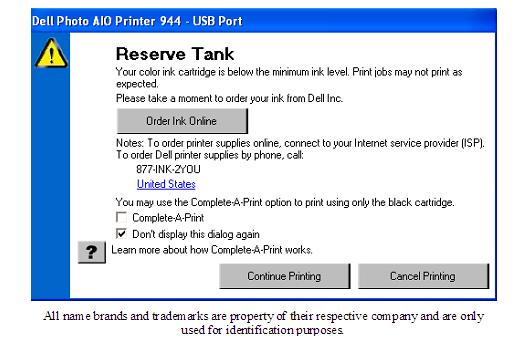
This happens because there is no way to reset the chip that reads the ink levels, so the cartridge is reading the old ink level and not the new, refilled one. Especially with Dells and Lexmarks, this is quite common; but directions are enclosed with each cartridge on how to bypass this error message so you can still print. Below is a picture of what usually pops up. Just tick the "Don't display this dialog box again" to continue printing.
Error Message: "Cartridge Empty"
Most Brother printers have an LED light sensor that checks whether the ink is full or not, a faulty system. If the beam of light bounces back, from the reflection of the ink in the cartridge, the machine assumes there is ink in the cartridge and continues to operate. If the light does not bounce back, the light passes through the cartridge and the machine assumes that the cartridge is empty and starts beeping empty. The solution is to cover the eyes that read the ink level.
- LC41 Cartridges-cover the front part of the cartridge("spine" looking part) with a small piece of black tape or black it out with a sharpie or permanent marker.
- LC51 Cartridges-cover the bottom part of the cartridge(square holed groove in the center) with a small piece of black tape or scotch tape and black it out with a sharpie or permanent marker.
- Toner Cartridges-cover the both sides where you notice a clear eye
Our compatible cheap ink cartridges achieve the highest performance and quality standards and are the great replacements for HP, Epson, Canon, Brother, and other name brand printer ink cartridges.